
The best Chrome extension for GitHub code review is the one that removes your biggest friction: a PR inbox if you lose track of review requests, a diff enhancer if reading code on GitHub is the pain, or a notification manager if your inbox is the bottleneck. This roundup covers all three so you can match the tool to the problem.
TL;DR
- Lose track of PRs? → PRFlow (side-panel PR inbox)
- Reading diffs is the pain? → Refined GitHub
- Notification overload? → Octobox
- Want richer file trees / code nav? → Octotree / GitHub native file tree
What makes a good code-review extension?
Before the list, the criteria. A code-review extension earns a spot on your toolbar if it does at least one of these well:
- Surfaces the right PRs without you hunting for them.
- Makes diffs easier to read — syntax, whitespace, large-file handling.
- Cuts notification noise so review requests don't get buried.
- Respects your privacy — a tool that reads your repos should be clear about where that data goes.
1. PRFlow
Best for: developers who lose track of review requests across multiple repos.
PRFlow lives in Chrome's native side panel and turns your scattered pull requests into one deduplicated inbox, grouped by role: PRs waiting on your review, your own open PRs, and PRs you've reviewed but not yet merged. Filter by org or repo, toggle groups off to focus.
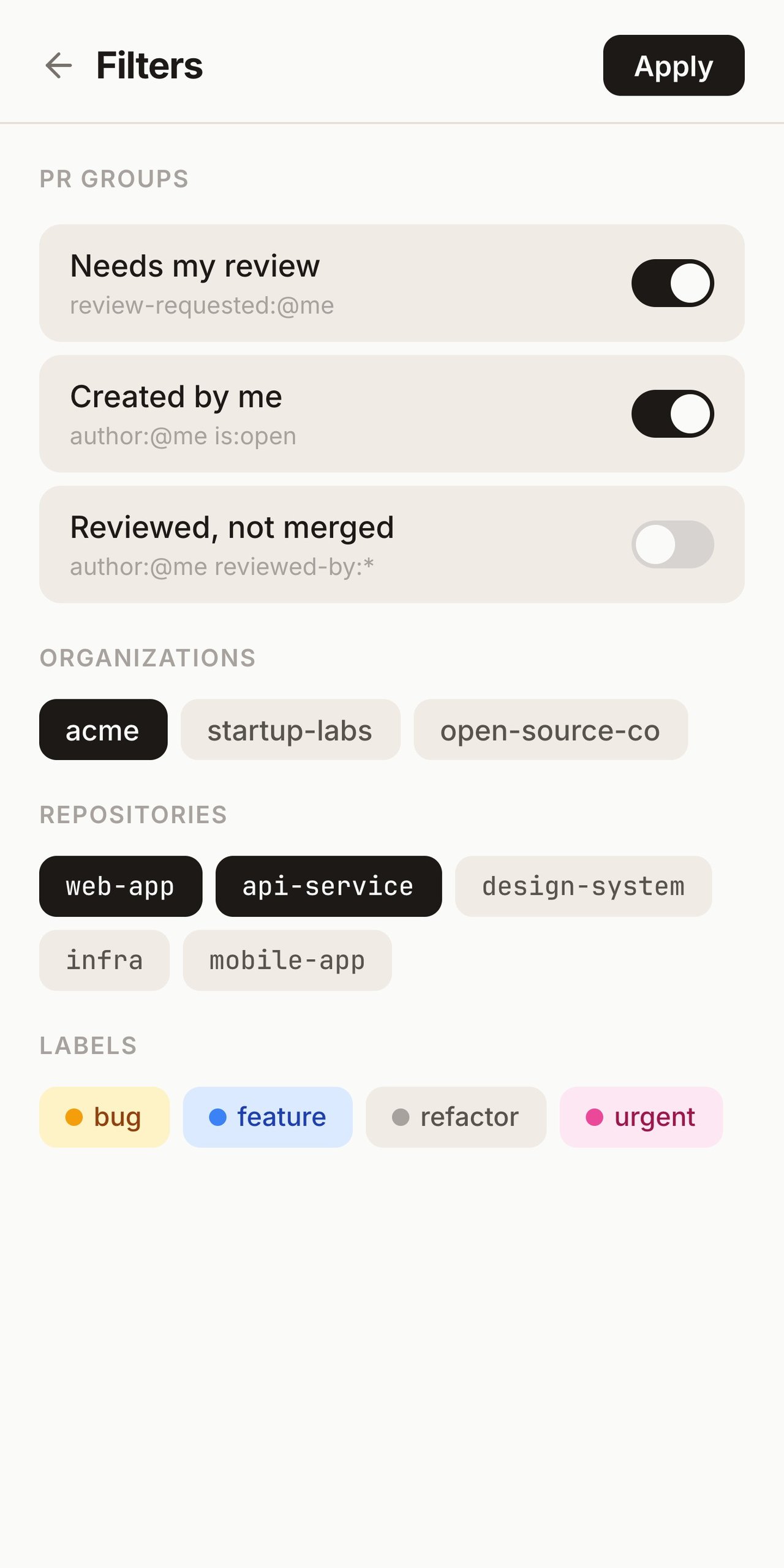
What sets it apart is the side panel itself: it stays open across tab switches,
so your review queue is always visible without stealing the foreground. It's
local-first and read-only — your Personal Access Token is stored in
chrome.storage.local, requests only go to api.github.com, and PRFlow never
writes to your repositories. Free to use, with a Pro tier at $29/year.
- Strengths: persistent PR inbox, dedup across roles, privacy-first, zero separate web app.
- Trade-off: focused on pull requests — not a diff enhancer or general GitHub UI tweaker.
2. Refined GitHub
Best for: people whose pain is reading and navigating GitHub itself.
Refined GitHub is a long-running open-source extension that injects dozens of quality-of-life improvements directly into GitHub's UI: one-click merge-conflict resolution helpers, clearer diffs, quick file filters, and many small keyboard/clipboard shortcuts.
- Strengths: huge collection of UI refinements; open source; free.
- Trade-off: it enhances the GitHub pages you're already on — it doesn't give you a standalone inbox of what needs your attention.
3. Octobox
Best for: taming GitHub notifications across many repos.
Octobox treats your GitHub notifications like an email client — archive, snooze, mark as read, organize. It's great if your bottleneck is notification volume rather than diff reading.
- Strengths: powerful notification triage; web app + extension.
- Trade-off: it's notification-centric and largely server-side, so it's a different privacy and workflow model than a local-first PR inbox.
4. Octotree
Best for: navigating large repositories quickly.
Octotree adds an IDE-like file tree to GitHub, making it faster to jump around a big codebase while reviewing. (GitHub's own file tree has narrowed the gap, so try the native one first.)
- Strengths: fast code navigation in large repos.
- Trade-off: navigation only — no PR tracking or notification management.
How they compare
| Extension | Core job | Surface | Privacy model |
|---|---|---|---|
| PRFlow | PR inbox (review requests, your PRs) | Chrome side panel | Local-first, read-only |
| Refined GitHub | UI/diff enhancements | Injected into GitHub | Local, open source |
| Octobox | Notification triage | Web app + injection | Largely server-side |
| Octotree | Repo file-tree navigation | Injected into GitHub | Local |
A note on privacy and permissions
Code-review extensions are unusually sensitive: to be useful, they read your repositories — sometimes private ones. Before you install any of them, it's worth checking three things:
- Where does your token or auth live? Local storage (on your machine) is a very different risk profile than a server-side database you don't control.
- What can it do? A read-only tool that only displays PRs can't push, merge, or modify anything. Prefer least privilege.
- What leaves your machine? The ideal answer is "only API calls to GitHub." Extensions that route your repo data through their own backend for processing are making a different trade.
PRFlow was built around these answers deliberately: local-first, read-only, GitHub-only network traffic. Whatever you choose, ask the same questions.
How to stack them without bloat
More extensions isn't better — each one is a permission grant and a potential slowdown. A lean, high-leverage stack for most reviewers is just two:
- A PR inbox (PRFlow) so you never lose track of what needs you, plus
- A diff enhancer (Refined GitHub) so the review page itself is pleasant.
Add a notification manager only if your bottleneck is genuinely notification volume, and a file-tree tool only if you spend a lot of time navigating huge repos. Resist installing all four "just in case" — toolbar entropy is real, and every extension you grant repo access to is part of your attack surface.
Frequently asked questions
What is the best Chrome extension for GitHub pull requests?
For tracking pull requests specifically — making sure review requests don't get lost — a side-panel PR inbox like PRFlow is the most direct fit, because it collects every PR that needs you into one deduplicated list. For improving the GitHub diff and review page itself, Refined GitHub is the standard pick. The "best" Chrome extension depends on whether your pain is finding PRs or reading them.
Is there a Chrome extension that shows GitHub PRs in the side panel?
Yes. PRFlow is a Chrome extension built specifically around Chrome's native side panel, showing your GitHub pull requests in a persistent column that stays open across tab switches. Most other GitHub extensions inject into the GitHub page itself rather than using the side panel.
What's the best GitHub PR review tool for multiple repositories?
A tool that aggregates across repos beats anything repo-scoped. The GitHub CLI
(gh) is great for terminal-driven review, while a PR inbox extension like
PRFlow gives you an always-visible, cross-repo list in the browser. Teams
reviewing across many repositories usually combine a PR inbox with CODEOWNERS for
routing.
Are GitHub code review extensions safe to use?
They can be, but they read your repositories — sometimes private ones — so check
where your token lives (local vs. server-side), what permissions the extension
holds (prefer read-only), and what data leaves your machine. PRFlow is
local-first and read-only and only talks to api.github.com; apply the same
scrutiny to any extension you grant repo access.
Which one should you install?
They're not really competitors — they solve different problems, and many reviewers run more than one. If the thing that hurts is losing review requests in a sea of tabs and emails, start with a PR inbox: install PRFlow from the Chrome Web Store. If reading diffs is your pain, add Refined GitHub on top.
Related: Too many GitHub tabs? · Too many GitHub emails? · The complete GitHub PR review workflow guide.