
A good GitHub pull request review workflow comes down to three habits: see every PR that needs you in one place, review on a predictable cadence, and keep the queue current so nothing goes stale. This guide walks through every tool for doing that — GitHub's native UI, the CLI, bots, and browser extensions — and how to combine them as your repo count grows.
TL;DR
- The hard part of PR review at scale isn't reviewing — it's not losing track.
- GitHub's native surfaces work, but they're fragmented across pages.
- Build a single inbox of PRs grouped by your role, review in batches, and measure your review latency.
- A side-panel PR inbox like PRFlow makes the "one place" habit automatic.
Why is GitHub PR review so hard to manage?
It isn't the reviewing itself — it's the tracking. On a single repo with a couple of open PRs, GitHub's UI is fine. The trouble starts when you're a reviewer on five repos, an author on three, and a participant in a dozen threads. Now "what needs me right now?" has no single answer, because GitHub spreads that information across:
- The Pull requests tab, scoped per-repo.
- The global pulls search with
review-requested:@me. - The notifications inbox.
- Email, if you haven't turned it off.
Each surface shows a slice. None shows the whole picture, deduplicated, in priority order. So review requests slip, authors wait, and a one-line change sits unmerged for two days because nobody knew it was their turn.
What does a healthy review workflow look like?
A workflow that scales has four properties. Use them as a checklist when you evaluate any tool below.
- Single inbox. One list of every PR that needs you, deduplicated across roles (reviewer, author, post-review).
- Role grouping. "Waiting on my review" is a different job from "my PR has changes" — they should be visually separate.
- Predictable cadence. Review in batches at set times, not on every notification ping.
- Low latency. You can see and improve your time-to-first-review — the metric teammates feel most.
The tools, and where each fits
GitHub's native UI
The built-in surfaces are the baseline everyone starts with.
is:open is:pr review-requested:@mein the global pulls search is the single most useful native query — it lists every PR across every repo that's waiting on you. Bookmark it.author:@meshows your own open PRs.- The notifications inbox catches comments and re-requests.
Strengths: zero setup, always available, authoritative. Trade-off: fragmented — you're stitching three bookmarks together in your head, and none of them stays visible while you work. The moment you switch to your editor tab, the queue is out of sight.
The GitHub CLI (gh)
For terminal-centric reviewers, gh is excellent:
# PRs awaiting your review, across the current repo
gh pr list --search "review-requested:@me"

# Check out a PR locally to review it in your editor
gh pr checkout 1234

# Approve or request changes without leaving the terminal
gh pr review 1234 --approve
Strengths: scriptable, fast, lives where many devs already are. Trade-off: repo-scoped by default, and it's pull-based — you have to run it to see anything. It's a great review executor, not an ambient inbox.
Bots and automation
Bots reduce the human review load rather than organize it:
- CODEOWNERS auto-requests the right reviewers, so PRs don't sit unassigned.
- Dependabot / Renovate batch dependency PRs so they don't drown the queue.
- Danger / review bots enforce checklist items (tests, changelog) before a human looks.
- Auto-merge lands a PR once approvals and checks pass, removing the "approved but unmerged" limbo.
Strengths: removes toil and routing decisions. Trade-off: automation decides what and whether — it doesn't give you a clear view of what's left for you.
Browser extensions
This is where the "single visible inbox" gap gets filled. A few approaches:
- PR inbox extensions surface the PRs that need you, deduplicated.
- Diff enhancers (e.g. Refined GitHub) improve the review page itself.
- Notification managers (e.g. Octobox) triage the notifications stream.
For the tracking problem specifically, a PR inbox is the direct fix. (We compare the options in our roundup of the best Chrome extensions for code review.)
Building the workflow with PRFlow
PRFlow exists to make the "single visible inbox" habit automatic. It puts a deduplicated PR list in Chrome's native side panel, grouped by exactly the roles that matter:
- Pull requests waiting on your review
- Your own open pull requests
- PRs you've reviewed but not yet merged
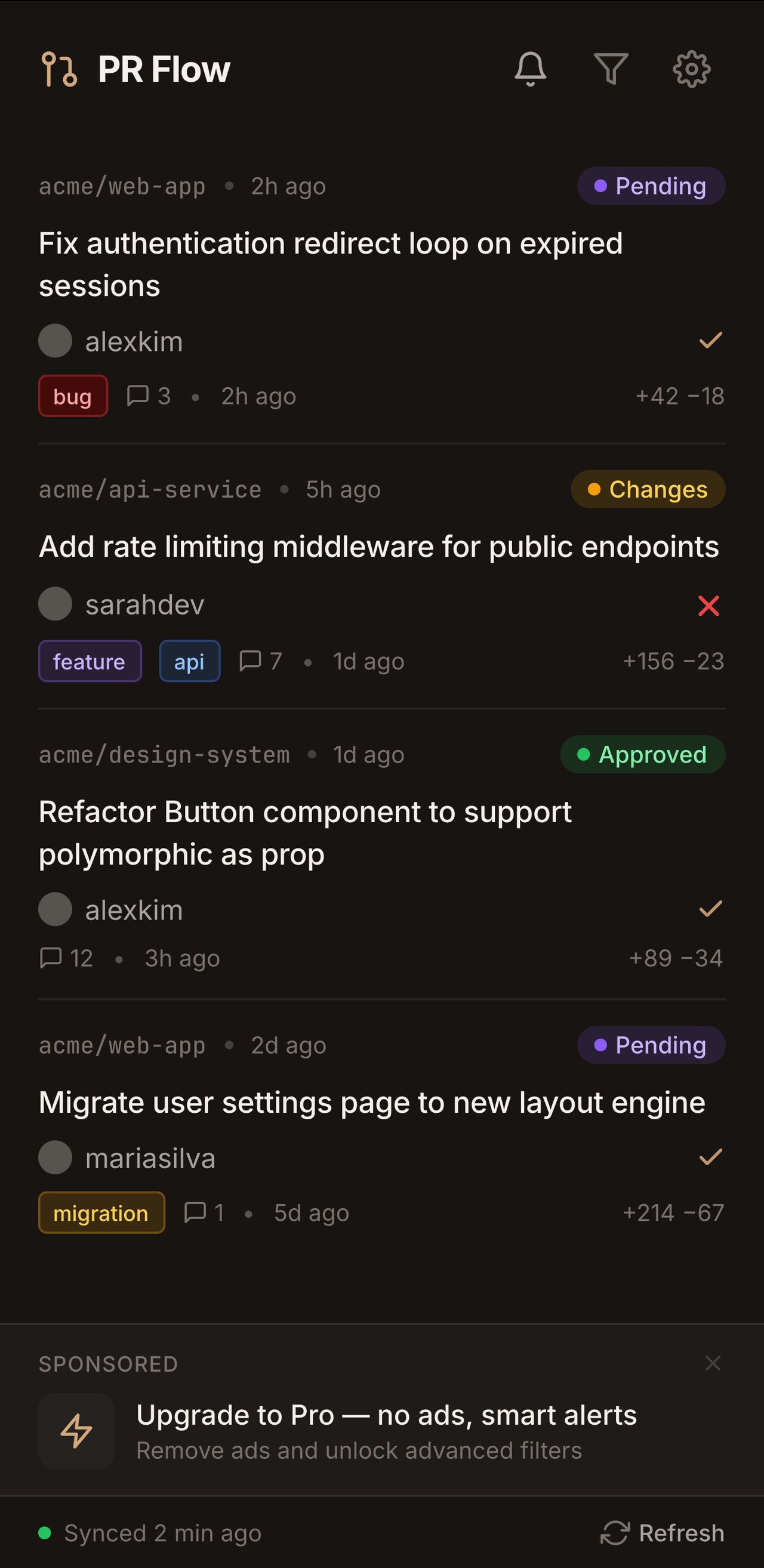
Because it's in the side panel, the queue stays open beside your editor and docs instead of becoming another tab to lose. Filter by org or repo to focus on one project; toggle a group off when you only want to clear review requests.
How to set up PRFlow
Three steps, about a minute:
- Sign in with GitHub. Authorize PRFlow to read your account.
- Add a Personal Access Token. Create a token with the
repo,notifications, andread:orgscopes and paste it once. It's stored locally inchrome.storage.localand only ever sent toapi.github.com. - Open the side panel. Your PRs appear, grouped and deduplicated. Set org/ repo filters and you're done.
PRFlow is read-only — it never writes to your repositories — and local-first, so your PR data isn't processed on someone else's server. It's free, with a Pro tier at $29/year.
A practical daily cadence
Tools only help if the habit is good. A cadence that works for high-volume reviewers:
- Two review sweeps a day (say, start of day and after lunch). Open the side panel, clear the "waiting on my review" group first — that's the work blocking other people.
- Batch, don't interrupt. Resist reviewing on every notification. With an always-visible inbox you don't need to; the queue will still be there at your next sweep.
- Close the loop on your own PRs. Check the "my open PRs" group for requested changes so your authors aren't waiting on you.
- Drain the post-review group. "Reviewed but not merged" is where small PRs die — merge or nudge them.
How do you review large pull requests?
Big PRs are where review workflows break down. A 2,000-line diff invites rubber-stamping because no one can hold it in their head. A few tactics keep large reviews honest:
- Push back on size at the source. The cheapest fix is a smaller PR. If a change is genuinely large, ask the author to split it into a stacked series — scaffolding first, then behavior, then tests — so each piece is reviewable on its own.
- Review by commit, not by squashed diff. A well-structured PR tells a story through its commits. Reviewing commit-by-commit turns one overwhelming diff into a sequence of small, intentional ones.
- Start with the interface, then the implementation. Read the public API, the types, and the test names first. They tell you what the change claims to do; the implementation only tells you how.
- Time-box it. If a review will take more than ~30 minutes, do it in passes and leave a comment saying where you stopped, so the author isn't blocked on a perfect single sitting.
Review etiquette that keeps the queue moving
Tooling surfaces the work; etiquette keeps it from piling back up.
- Separate blocking from non-blocking feedback. Prefix nits (
nit:,optional:) so authors know what actually blocks a merge versus what's a preference. A wall of equally-weighted comments stalls a PR. - Approve with minor comments. If your only remaining notes are nits, approve and leave them. Forcing a second round trip for a variable name is how small PRs rot in the "reviewed but not merged" group.
- Re-request explicitly. When you push changes, re-request review instead of assuming the reviewer is watching. In an inbox-driven workflow this is what moves the PR back into their "waiting on my review" group.
- Resolve threads you addressed. It shrinks the reviewer's re-review surface to just what changed.
Solo and small-team workflows
You don't need a team to benefit from this. As a solo developer or maintainer, the queue is still real — it's just your own open PRs across personal projects, plus review requests from occasional contributors.
The same inbox habit applies, scaled down: one visible list of your open PRs and any incoming contributions means a drive-by community fix doesn't sit unmerged for a month because it arrived as an email you skimmed once. For maintainers, fast time-to-first-response is also the single biggest factor in whether contributors come back — an always-visible queue makes that response reliable.
Common anti-patterns to avoid
- Treating notifications as the queue. Notifications are events, not state. They tell you something happened, not what currently needs you. Drive off an inbox of live PR state instead.
- Reviewing reactively all day. Every ping is a context switch. Batch reviews into a couple of sweeps and protect your maker time.
- Letting "approved but unmerged" accumulate. This is the silent killer. A PR everyone approved but nobody merged is pure waste — it can go stale, hit conflicts, and need re-review. Drain that group deliberately.
- One person reviewing everything. A single reviewer is a bottleneck and a bus factor. Use CODEOWNERS to spread the load and make review a team habit, not a hero's job.
How to measure if it's working
Two metrics tell you whether the workflow is healthy:
- Time-to-first-review: how long a PR waits before anyone reviews it. This is what teammates feel. Shrinking it is the whole point of a visible inbox.
- Open review-request count at end of day: if your "waiting on my review" group is reliably near zero by EOD, you're not the bottleneck.
You don't need a dashboard to start — just watch whether your review-request group empties out each day. If it does, the workflow is doing its job.
Setting team-level review norms
Individual habits compound, but a team gets the biggest win from a few shared
norms written down somewhere everyone sees (a CONTRIBUTING.md is a good home):
- A review SLA. Agree on a target like "first review within one business day." It doesn't have to be aggressive — it has to be explicit, so a waiting author knows when it's fair to nudge.
- A working-hours assumption. Across time zones, "one day" means one working day for the reviewer. Make that explicit so nobody feels ignored overnight.
- Draft PRs for work-in-progress. Open as a draft until it's genuinely ready; it keeps not-yet-reviewable work out of everyone's "waiting on my review" group and signals readiness clearly when you mark it ready.
- Small PRs as a cultural default. The most effective review norm is simply "keep PRs small." Small PRs get reviewed faster, get better feedback, and rarely go stale — which means the whole inbox stays shallow.
- Rotate or share review load. Use CODEOWNERS and, if needed, a rotation so review isn't quietly dumped on the one person who always says yes.
Norms only stick if the workflow makes them easy. An always-visible, role-grouped inbox is what turns "review within a day" from a hope into something you can actually see slipping and fix before an author is blocked.
Putting it together
The native UI and gh are your authoritative sources. Bots cut the toil.
Diff enhancers make the review page nicer. But the habit that actually scales PR
review is keeping one deduplicated, role-grouped inbox visible while you work —
and reviewing it on a cadence instead of reacting to pings.
If you want that inbox without building it yourself, install PRFlow from the Chrome Web Store and start your next review day with the queue already in front of you.
Related: Too many GitHub tabs? · Too many GitHub emails? · Best Chrome extensions for code review.