
If your browser is a wall of GitHub tabs, the fix isn't another tab — it's a single pull-request inbox that lives in Chrome's side panel. Keep your PRs visible next to whatever you're actually working on, and stop hunting through tabs for the one review you forgot.
Why do GitHub tabs pile up?
GitHub scatters your pull requests across separate pages. The PRs waiting on your review live on one URL. Your own open PRs live on another. The notifications inbox is a third. So you do the natural thing: you open a tab for each, leave them open "just for now," and by mid-afternoon you have fifteen GitHub tabs that all look identical.
The real cost isn't screen clutter. It's the review request that slid off the edge of the tab strip on Tuesday and blocked a teammate until Thursday.
What actually fixes tab overload?
Closing tabs doesn't fix it — the work is still there, you've just hidden it. The fix is to stop using tabs as your task list and use a real inbox instead. A good PR inbox does three things tabs can't:
- Deduplicates. One PR shows up once, even if you're both a reviewer and a participant.
- Stays in one place. It doesn't compete with your code, docs, or Jira tab for a slot in the strip.
- Stays current. It reflects the live state on GitHub without a manual refresh-all-tabs ritual.
One inbox, three roles
PRFlow is a Chrome extension that pulls every pull request that needs you into a single, deduplicated list in the browser's native side panel. Most days a PR sits in one of three states, and PRFlow groups them exactly that way:
- Pull requests waiting on your review
- Your own open pull requests
- PRs you've reviewed but not yet merged
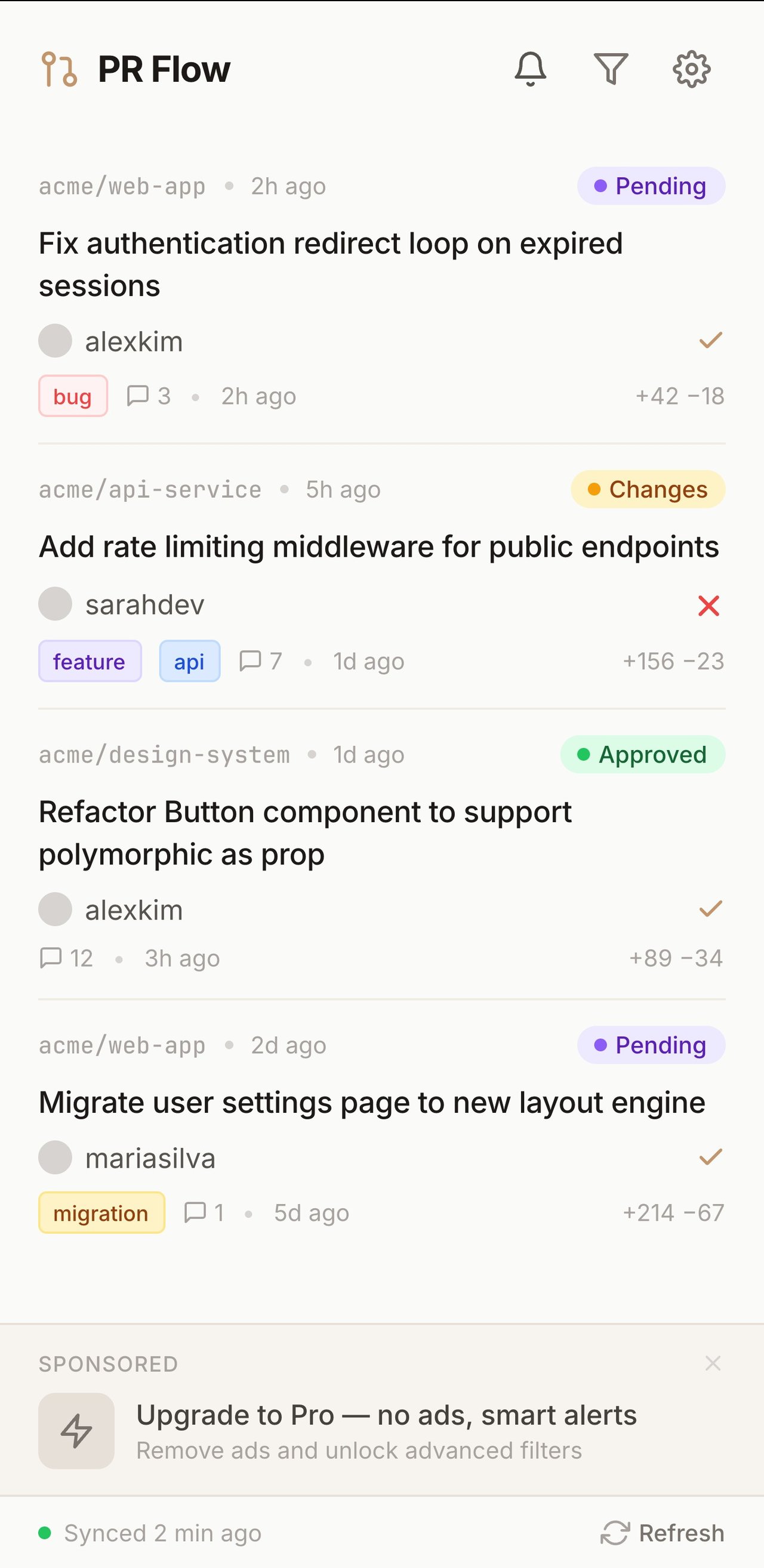
Toggle any group off to focus, and filter the rest by org or repo. Because it lives in the side panel, it sits beside your work instead of becoming one more tab to lose.
What about pinned tabs and bookmarks?
The usual workarounds each fall short in the same way. Pinned tabs for the pulls search and your notifications help a little, but they're still tabs you have to click into, and they don't deduplicate or group by what you actually need to do next. Bookmarks are worse — they're a static link to a page you still have to open and scan.
The deeper problem is that all of these treat a web page as your task list. A page reflects GitHub's structure (per-repo, per-view), not your structure (what needs me, right now, across everything). You end up doing the merge in your head, every time you switch context. That mental dedup is exactly the work a real inbox should do for you.
The side panel is the whole point
Chrome's side panel is a persistent column that stays open across tab switches. A normal extension popup vanishes the moment you click away; the side panel doesn't. That difference is what turns "a list of PRs" into "a list of PRs I actually keep looking at." Your review queue is always one glance away, and it never steals the foreground from the thing you're building.
Set it up in about a minute
Sign in with GitHub, paste a Personal Access Token once, and open the side
panel. The token is stored locally in chrome.storage.local and only ever
travels to api.github.com. PRFlow is read-only — it never writes to your
repositories.
Does this actually save time?
The time you lose to tab overload isn't the seconds spent clicking — it's the context switching and the dropped work. Every time you scan the tab strip looking for "the PR I was supposed to review," you pay a small attention tax. Multiply that by a dozen times a day and it adds up to real focus lost.
The bigger cost is invisible: the review that never surfaces because its tab got closed during an afternoon cleanup, or the PR that sat for two days because it never made it into a tab at all. An inbox you can't accidentally close removes both failure modes. You stop relying on memory and a fragile row of identical tabs, and start working from a list that's simply correct.
That's the shift: from "I think I have all my PRs open somewhere" to "I can see every PR that needs me, and I didn't have to keep a single tab open to do it."
Frequently asked questions
How do I see all my GitHub pull requests in one place?
GitHub's global pull request search with
review-requested:@me and author:@me is the native starting point, but it's
spread across separate queries and pages. A dedicated GitHub PR tracker for
Chrome like PRFlow collects all of them into one deduplicated side-panel list,
so every pull request that needs you is visible at once instead of behind a row
of tabs.
Is there a GitHub PR dashboard for Chrome?
Yes. PRFlow is a Chrome extension that acts as a GitHub PR dashboard in the browser's side panel — grouping your pull requests by review requests, your own open PRs, and PRs you've reviewed but not merged. Because it's a side panel, the dashboard stays open while you work instead of being a tab you switch to.
How do I stop opening so many GitHub tabs?
Stop using tabs as your task list. The reason tabs pile up is that each GitHub view lives on its own page, so you open one per PR to avoid losing it. Move that job to a pull request tracker that keeps a live, deduplicated list in one place, and you no longer need a tab per PR to remember it exists.
Does PRFlow work across multiple repos and orgs?
Yes — it pulls pull requests across every repo and org your token can see, then lets you filter by org or repo when you want to focus on one project. That's the whole point: one inbox for many repos, instead of one tab per repo.
If you've been drowning in GitHub tabs, the answer was never a sixteenth tab. Grab PRFlow from the Chrome Web Store and give your tab strip back to the work that actually needs it.
Related: Too many GitHub notification emails? and the complete guide to a GitHub PR review workflow.